
NitroModules beats TurboModules by ~15x on raw JS↔native call overhead, and Turbo still wins on zero-dependency convenience — here’s when each choice actually makes sense. Nitro is a Swift/Kotlin-first framework built on JSI with direct C++ interop, while TurboModules is React Native core’s battle-tested default. Below: a full feature matrix, real benchmark numbers from the NitroBenchmarks repo, a hands-on walkthrough of your first Nitro module, and a migration path if you’re already on Turbo. The verdicts below come from the benchmark data and the walkthrough steps, not from brand preference.
What is Nitro?
The official Nitro docs describe it best:
Nitro is a framework for building powerful and fast native modules for JS. Simply put, a JS object can be implemented in C++, Swift or Kotlin instead of JS by using Nitro.
Historically, TurboModules has been the de-facto way to write native modules since around 2022. It claimed better performance than the legacy Native Modules it replaced — how it achieved those gains is a topic for another post.
Today the benchmarks tell a different story: Nitro outperforms Turbo, and it is steadily becoming the default choice for new native modules (the full numbers are shown in the benchmarks section below).
NitroModules vs TurboModules at a glance
| TurboModules | Expo Modules | NitroModules | |
|---|---|---|---|
| Shipped with React Native core | ✅ zero deps | ❌ (expo package) | ❌ (npm i react-native-nitro-modules) |
| iOS implementation language | Objective-C (Swift via ObjC bridge) | Swift (bridges through ObjC) | Swift (direct C++ interop) or C++ |
| Android implementation language | Java / Kotlin | Kotlin | Kotlin or C++ |
| Code generator | Codegen — runs on every app build | None (handwritten TS defs) | nitrogen — run explicitly, generated code ships in the npm package |
| Native objects | Singletons only | “Shared objects” | HybridObject with real lifecycle + GC integration |
| Typed properties | ❌ getter/setter methods only | ✅ | ✅ |
| First-class JS callbacks | ❌ untyped Events | ❌ Events, no callback return values | ✅ typed callbacks, can return values |
Tuples / null / ArrayBuffer | ❌ / ❌ / ❌ | ❌ / ❌ / ✅ | ✅ / ✅ / ✅ |
| Synchronous native calls | Limited | ❌ | ✅ |
What the benchmarks actually say
Numbers from NitroBenchmarks (iPhone 15 Pro, release build, 100,000 synchronous calls):
| Operation | Expo Modules | TurboModules | NitroModules |
|---|---|---|---|
100,000 × addNumbers(...) | 434.85 ms | 115.86 ms | 7.27 ms |
100,000 × addStrings(...) | 429.53 ms | 179.02 ms | 29.94 ms |
That’s ~15x faster than Turbo and ~59x faster than Expo on addNumbers, ~5x / ~13x on addStrings.
The honest caveat: these numbers measure JS↔native call overhead only — and the benchmark author says it himself. In real workloads where the native work dominates (API requests, navigation, forms), Turbo and Nitro finish within noise of each other. The overhead advantage matters when you cross the bridge thousands of times per second: camera frames, audio, sensors, crypto.
Swift support: the boilerplate difference
For iOS developers, this is probably the most interesting part of Nitro. Nitro supports Swift directly, whereas TurboModules bridges Swift through Objective-C. The practical result is a lot less boilerplate. For example:
class HybridMath : HybridMathSpec {
  var someValue: Double
}
compared with TurboModules’ Objective-C approach:
@implementation RTNMath {

  NSNumber* _someValue;
}
RCT_EXPORT_MODULE()

- (NSNumber*)getSomeValue {
  return _someValue;
}
- (void)setSomeValue:(NSNumber*)someValue {
  _someValue = someValue;
}
@end
This is possible because Nitro bridges Swift via a C++ interface.
The one place Turbo still wins
TurboModules ships with React Native core, so if keeping dependencies minimal matters to you, Turbo is the more convenient choice. For everyone else, adding one package is cheap:
npm i react-native-nitro-modulesgo ahead and add Nitro to your project.
Hands-on: your first Nitro module
Enough theory — let’s build one. There are several ways to scaffold a Nitro module; for this walkthrough we’ll use create-nitro-module.
npx create-nitro-module@latestWe’ll name the package react-native-math. Once it’s generated, enter the package directory:
cd react-native-mathYou’ll find node_modules and a nitrogen/ directory with the generated bridging code already in place. Next, install the example app’s dependencies:
cd example/
npm i
Now open the android directory in Android Studio and start editing the native code:
studio android/Once the project opens and Gradle sync finishes (it can take a while), you’ll see these files:
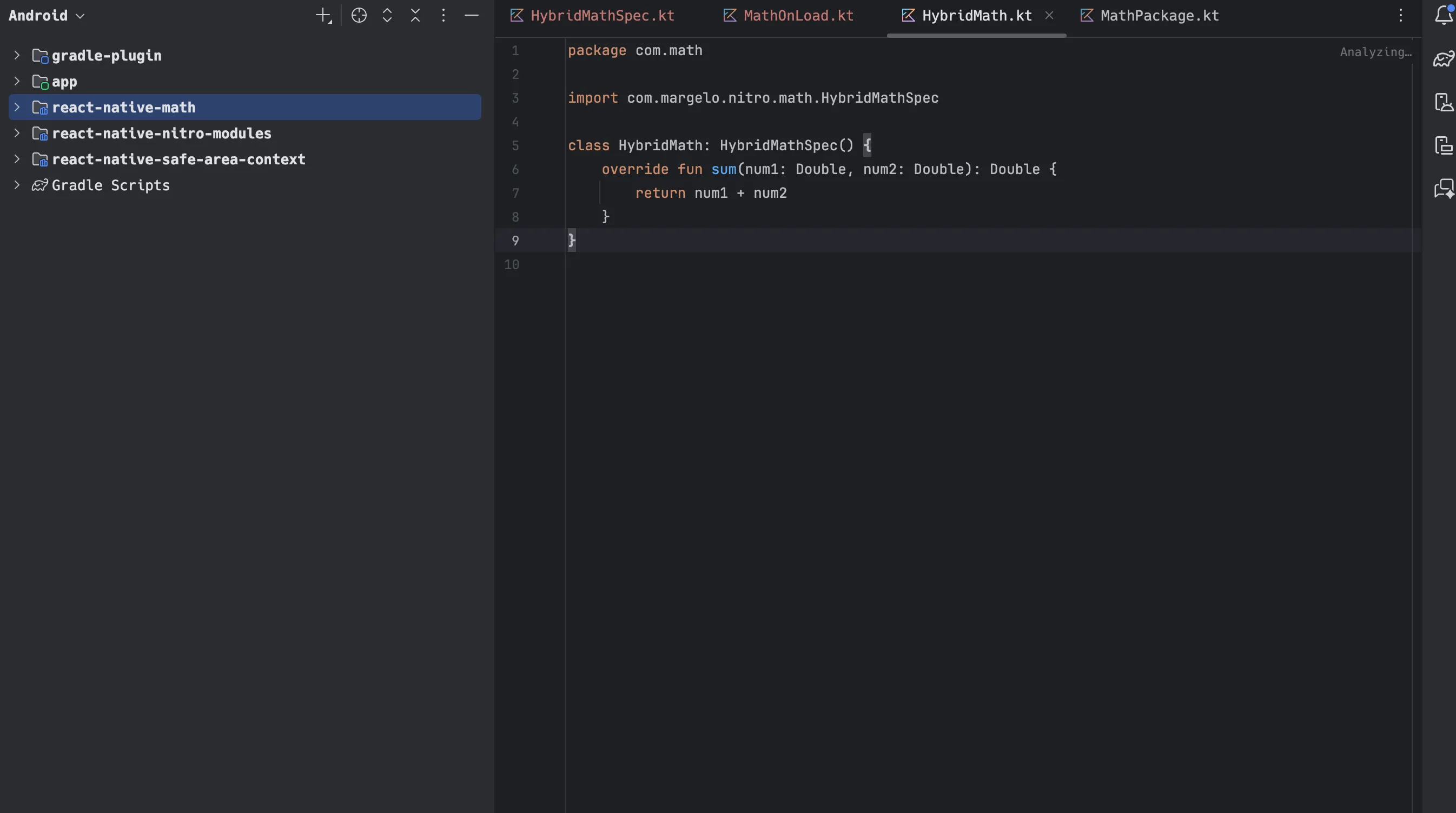
Now open math.nitro.ts and you’ll see the interface that defines the module:
import { type HybridObject } from 'react-native-nitro-modules'

export interface Math extends HybridObject<{ ios: 'swift', android: 'kotlin' }> {
  sum(num1: number, num2: number): number
}
Now add a sub function to implement on the native side:
import { type HybridObject } from 'react-native-nitro-modules'

export interface Math extends HybridObject<{ ios: 'swift', android: 'kotlin' }> {
  sum(num1: number, num2: number): number
  sub(num1: number, num2: number): number
}
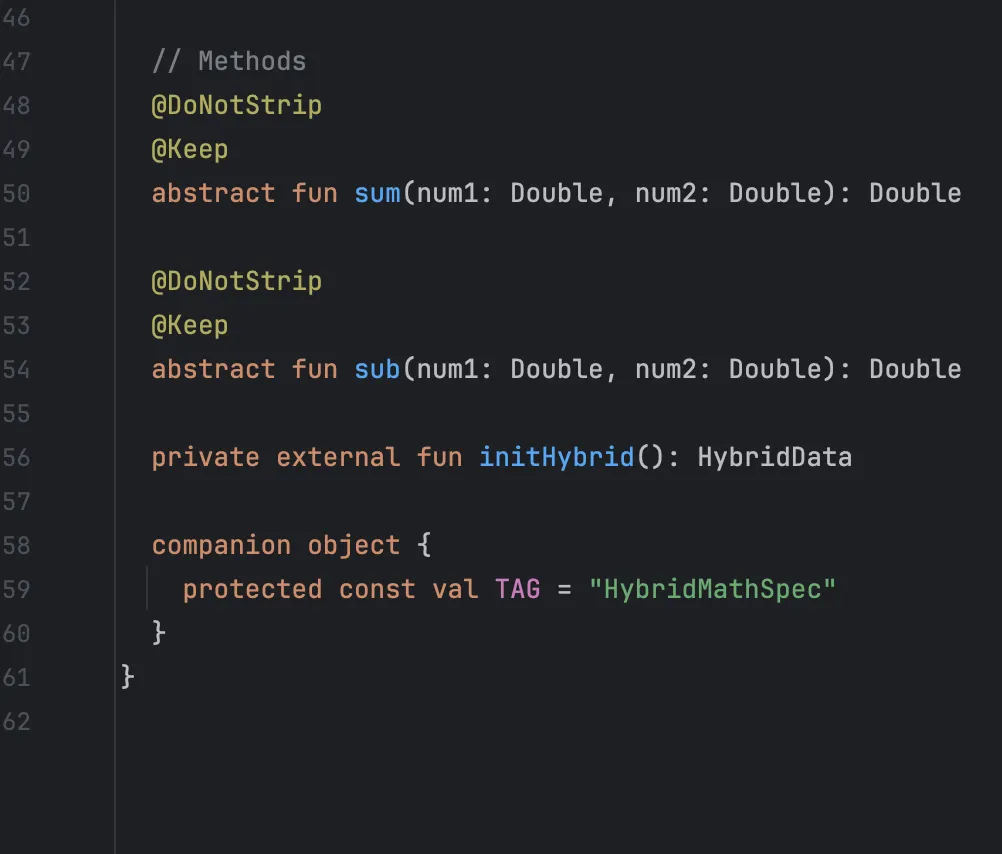
After editing the spec, regenerate the bridging code:
npm run codegenBack in Android Studio, the generated spec now includes the new method:
The best part: your editor immediately flags the unimplemented method:
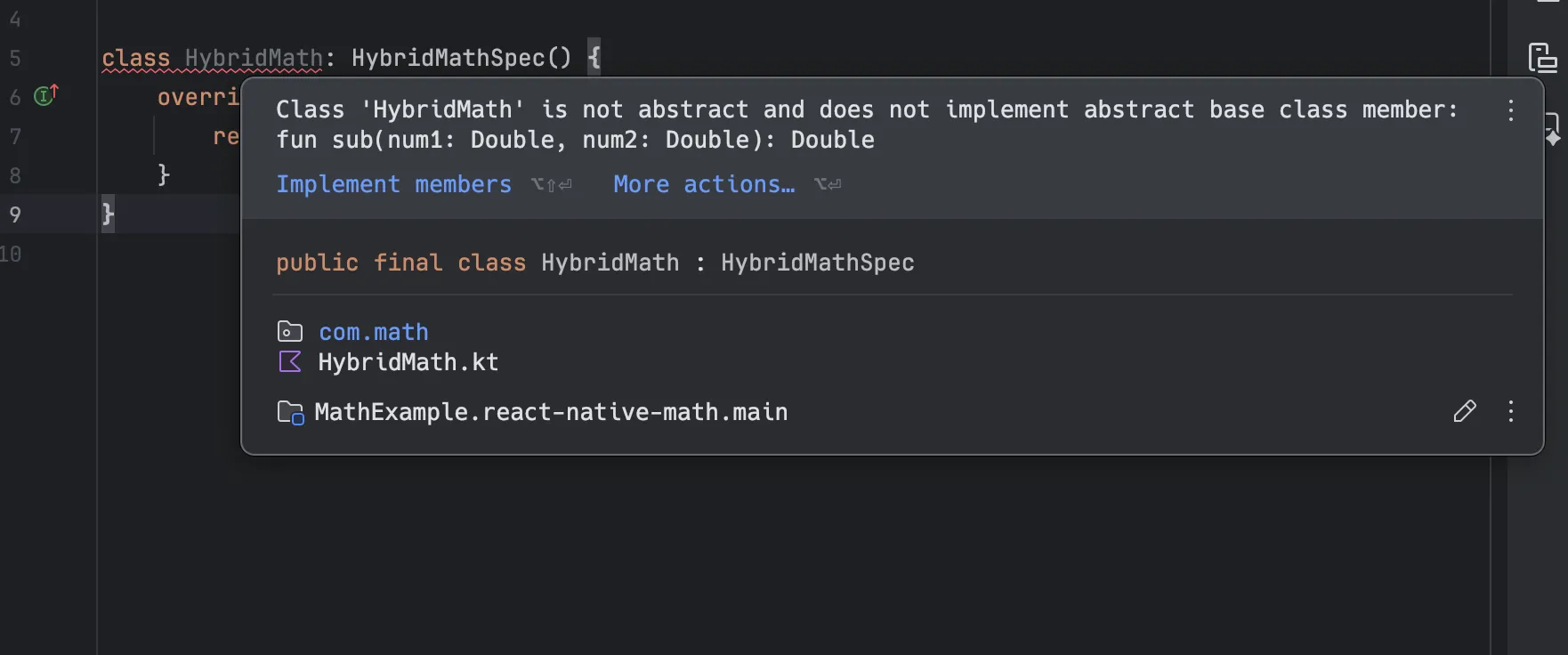
This is the payoff of running codegen during development: TurboModules only generate code at app compile time, so spec drift surfaces later. That provides type safety and better context when switching between TypeScript and native code.
Already using TurboModules?
Migrating is less scary than it sounds:
- Your TypeScript spec concept carries over — a Nitro
HybridObjectinterface is nitrogen’s equivalent of a TurboModuleSpec - Codegen → nitrogen: instead of codegen running invisibly at every app build, you run
npm run codegenexplicitly and the generated bridging code ships inside your package — consumers never regenerate it - The type errors you saw above surface in your editor at edit time, not at app compile time
- Both systems sit on JSI, so they can coexist while you migrate module by module
Which should you choose?
Choose TurboModules when:
- You’re publishing an OSS library and want zero third-party dependencies
- Your team is comfortable in Objective-C and values Meta’s long-term backing
- Maximum ecosystem compatibility matters more than call overhead
Choose Nitro when:
- The module is performance-critical (thousands of native calls per second)
- You want Swift/Kotlin without Objective-C boilerplate
- You want Hybrid Objects and typed callbacks instead of stringly-typed events
- You’re building on top of Nitro-based libraries (VisionCamera, etc.)
Choose Expo Modules when:
- You’re already in the Expo ecosystem and want the least boilerplate
- Raw call overhead isn’t your bottleneck
My take: the hype is real but narrower than it looks. Nitro didn’t invent a faster engine — JSI did. Nitro removes the friction around the engine. For most apps the difference is invisible; for the right workloads it’s the whole ballgame.
If you’re ready to try it, run npx create-nitro-module@latest and follow the walkthrough above. Want the full picture? Read the official comparison and check the raw numbers in NitroBenchmarks. And if Nitro saves you a weekend of Objective-C boilerplate, a star on the Nitro repo is a fair trade.
Sources and further reading
- Nitro documentation — what Nitro is and how the module system works
- Nitro vs. Turbo and Expo comparison — the official feature comparison
- Hybrid Objects — the object model the walkthrough above builds on
- NitroBenchmarks — the source of the benchmark numbers in this post
- Turbo Native Modules — React Native’s own TurboModules guide
- Nitro repository — source code and issue tracker